

Most current models accept a million tokens or more in a single request. Anthropic's documentation lists a 1M-token window as the default for its newest model families, with no beta flag. So the question teams keep asking is fair: why build a retrieval pipeline at all when you can paste the knowledge base into the prompt?
For some projects, you shouldn't. For others, that shortcut produces a slow, expensive assistant that quietly gets worse as the content grows. This guide covers how to tell which project you have.
The simplest option is often the right one
Anthropic's own advice in its Contextual Retrieval write-up (September 2024) is blunt: if your knowledge base is under roughly 200,000 tokens, about 500 pages of text, you can include all of it in the prompt and skip retrieval, and prompt caching makes that faster and cheaper. That advice predates today's larger windows, and it still holds for a reason that has nothing to do with model quality. A pipeline with a chunker, an embedding model, a vector store, a reranker and an evaluation set is a lot of moving parts. If you can delete all of it, do.
A typical fit: an internal policy assistant, a product FAQ bot for one product, a support agent grounded in a single runbook. The content is small, changes weekly rather than hourly, and every user asks against the same material.
Why long context is not free
Two problems show up as the prompt grows.
Quality. Anthropic's context-window documentation says that as token count grows, accuracy and recall degrade, which it calls context rot, and recommends curating what goes into context instead of filling the window. The older academic result points the same way: in "Lost in the Middle" (Liu et al., 2023), models did best when the relevant passage sat at the start or end of the input and noticeably worse when it was in the middle. Newer models handle this better than the ones tested then, but nobody should assume it is solved for their own documents. Test it.
Cost and latency. Every token you send is billed and processed on every request unless caching applies. Caching changes the arithmetic a lot, but only under conditions we cover below.
What prompt caching actually does
Using Anthropic's documented pricing structure as the example: writing to a 5-minute cache costs 1.25 times the base input price, a 1-hour cache write costs 2 times, and reading from the cache costs a fraction of base input, 0.1 times on most models and less on some newer ones. Check the current pricing page for your model, because those multipliers vary. The cache lifetime defaults to 5 minutes and refreshes each time the entry is used.
The rule that decides whether this helps you is in the docs: cache hits require 100 percent identical prompt segments, up to and including the block marked for caching. The cache is built in the order tools, then system prompt, then messages, and a change at one level invalidates everything after it. In practice:
- Put stable content first and anything that varies per request last.
- A timestamp or user name at the top of the system prompt defeats the cache every time.
- Editing a tool definition invalidates the entire cached prefix.
- Prompts below a model-specific minimum length are silently not cached.
import anthropic

client = anthropic.Anthropic()

response = client.messages.create(
    model="<your-model-id>",
    max_tokens=1024,
    system=[
        {"type": "text", "text": "You answer questions about our support runbook."},
        {
            "type": "text",
            "text": RUNBOOK_TEXT,  # the large, stable document
            "cache_control": {"type": "ephemeral"},  # breakpoint after the stable block
        },
    ],
    messages=[{"role": "user", "content": user_question}],
)

# Verify caching is working instead of assuming it:
print(response.usage.cache_creation_input_tokens, response.usage.cache_read_input_tokens)
Log those two usage fields in production. A team that believes it has caching but sees zero cache reads is paying full price for a long prompt on every call, which is the most common way this approach goes wrong.
When retrieval still wins
Retrieval earns its complexity in four situations.
- The corpus is bigger than the window, or will be. Hundreds of thousands of documents do not fit in any prompt.
- The content differs per user or session. Per-tenant data breaks cache sharing, so each request pays for the full prompt.
- You need tight latency. A model reading a few thousand retrieved tokens will usually respond faster than one reading a few hundred thousand. Measure this against your own latency budget rather than trusting a rule of thumb.
- You need citations you can trust. Returning the specific chunks makes it straightforward to show a source and to audit an answer. Pointing at a position in a giant prompt is harder to verify.
Retrieval has a failure mode of its own: if the right chunk is not retrieved, the model cannot use it. Anthropic reported that, on its test set, the share of failed retrievals in the top 20 chunks fell from 5.7 percent to 3.7 percent with contextual embeddings, to 2.9 percent when combined with contextual BM25, and to 1.9 percent with reranking added. The details of that benchmark are specific to Anthropic's datasets, but the pattern is worth copying: hybrid keyword and vector search, plus a reranker, beats plain embeddings.
A practical decision flow
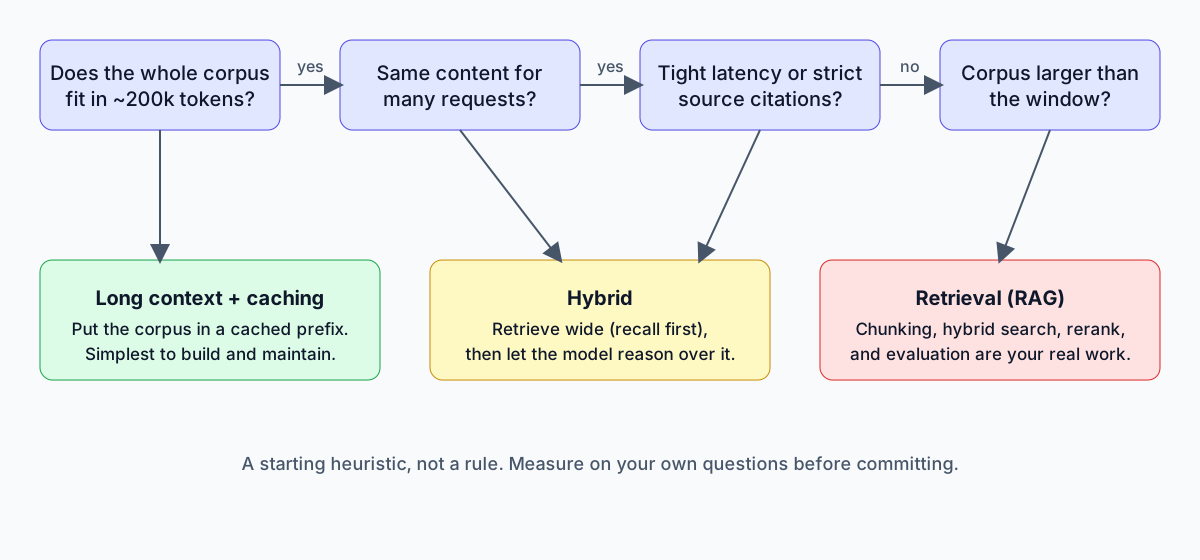
A starting heuristic, not a rule. Measure on your own questions before committing.
Start with the cheapest design that could work and move up only when you can point at the failure that forces it:
- Under about 200k tokens, content shared across users: long context with caching.
- Larger corpus, or per-user content: retrieval.
- Large corpus, but questions need synthesis across many documents: a hybrid. Retrieve generously, tuned for recall, then let the model reason over a big set of candidates rather than three snippets.
- Agents that run for many steps: neither approach alone. You also need a plan for what the agent keeps in memory between steps, which is a context-management problem rather than a retrieval one.
Security and cost notes
Whichever route you choose, anything placed in a prompt is visible to the model for that request. Do not load documents into a shared prefix that some users are not allowed to see. Access control belongs in the retrieval layer or in how you assemble the prompt, not in an instruction that says "only answer from the parts this user may read." With caching, remember that cache isolation is scoped to your organization (and workspace on some platforms), which is a reason to keep per-tenant content out of shared prefixes anyway.
For cost, estimate with your real numbers: tokens per request, requests per day, expected cache hit rate, and the multipliers for your model. A spreadsheet with those four inputs settles most arguments faster than benchmarks from someone else's workload.
Evaluate before you decide
The decision should not rest on opinion, ours included. Build 50 to 100 real questions with known answers, run them through the candidate designs, and compare answer accuracy, citation correctness, latency and cost per request. Re-run the set when content or models change. This is also the only reliable way to catch the slow decline that large prompts can cause.
Frequently asked questions
Is RAG obsolete now that context windows reach a million tokens? No. Larger windows moved the line at which you need retrieval, but corpus size, per-user content, latency and citation requirements still push many systems toward it.
Does a bigger context window mean better answers? Not automatically. Provider documentation describes accuracy and recall degrading as context grows, so curated, relevant context usually beats a full window.
How much does prompt caching save? It depends on the provider and model. Under Anthropic's published structure, cache reads cost a fraction of base input price, but you pay a premium to write the cache and only benefit when later requests reuse an identical prefix.
Can I combine RAG and long context? Yes, and for mid-sized or synthesis-heavy workloads it is often the best choice: retrieve broadly, then give the model enough material to reason over.
Where to go from here
If you are deciding how to ground an AI assistant in your company's documents, the cheapest mistake to avoid is building retrieval you do not need, or skipping it when you do. Our AI automation team designs and evaluates these systems, and our consulting service can review an existing assistant's cost, accuracy and access controls. For wider context on where agents fit, see AI agents for business. When you are ready, book a call.